Coming soon Desktop app for macOS, Windows and Linux · in final testing New Version 0.3.7 · Codex and Claude Code sign-in

Create charts and reports in plain language with AI chat

Load your Excel files or connect company databases, then ask questions like you would a colleague. onViz writes the query, runs it on your computer and draws the chart.

Free · macOS, Windows and Linux · Your files stay on your computer

Works with the data and AI you already use

  • Excel
  • CSV
  • PostgreSQL
  • MySQL
  • SQL Server
  • MongoDB
  • Grafana
  • Claude
  • ChatGPT
  • Claude Code
  • Codex

Features

Everything between a spreadsheet and a finished report

No Pivot tables, no VLOOKUP, no SQL. Ask, check the numbers, save the chart.

Chat to chart

Type a question in English or Vietnamese. The AI finds the right tables, writes and tests the query, draws the chart and sums it up in a few lines. Not quite right? Keep chatting, and every change can be undone.

All your numbers in one place

Drop in Excel (multi-sheet) or CSV files. onViz detects header rows, merged cells, dates and amounts stored as text. Connect PostgreSQL, MySQL, SQL Server, MongoDB or Grafana once.

Build once, reuse every month

Charts are tied to tables, not files. Next month, click Load more data. onViz checks the new file against the old structure, and every report shows the new numbers.

More than 25 chart types

Line, bar, pie, table with thresholds, big number, gauge, funnel, treemap, sankey, waterfall, calendar heatmap and more. Export PNG, CSV, Excel and PDF.

Dashboards with filters

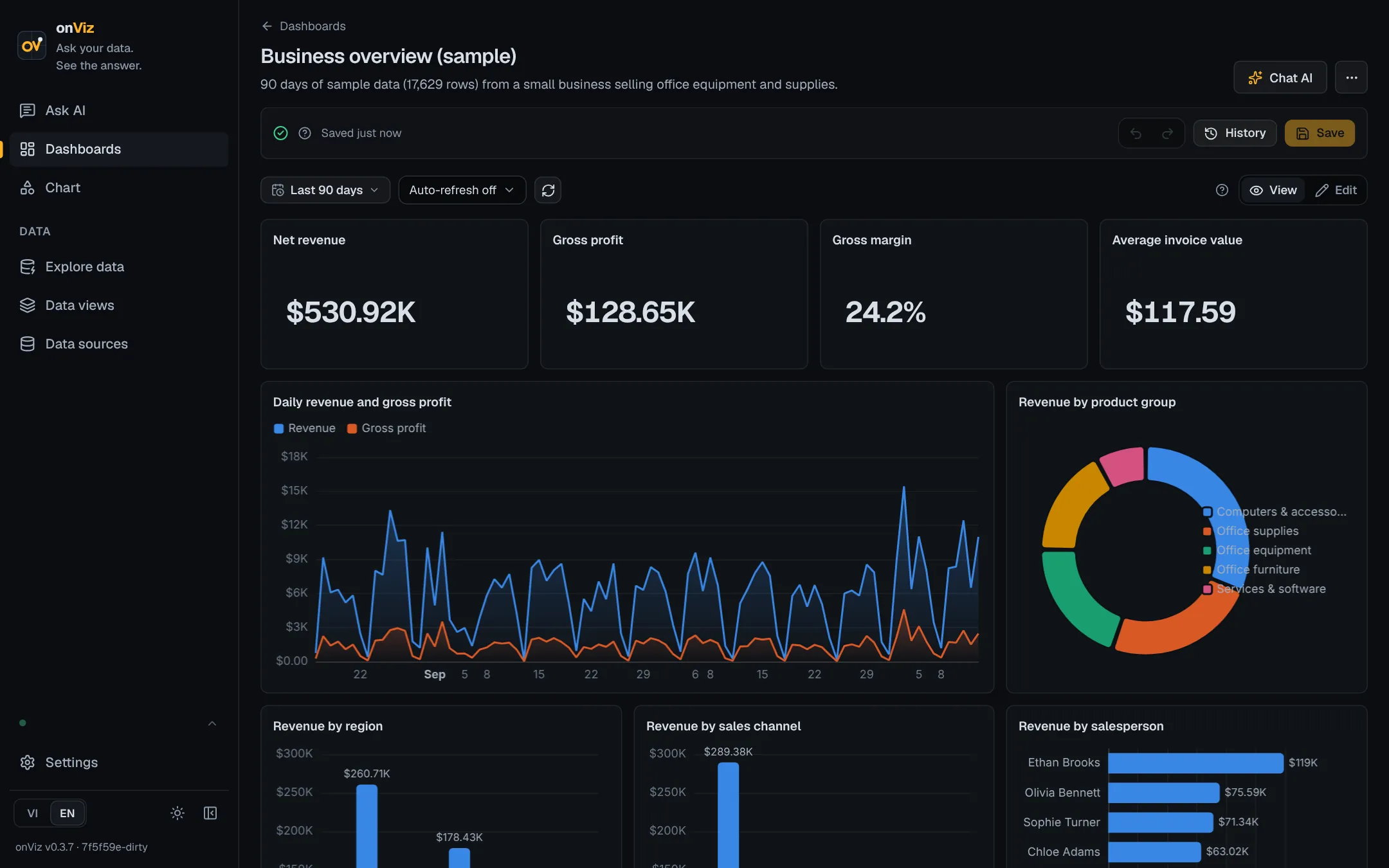
Drag charts onto a page, resize, add filters by month or branch. Drafts and history let you go back. Ready-made accounting and sales reports come with the sample data.

Share inside the office

Colleagues on the company network open your reports in a browser with a password you set. View only.

How it works

From a folder of spreadsheets to a monthly report in three steps

  1. 1

    Load your data

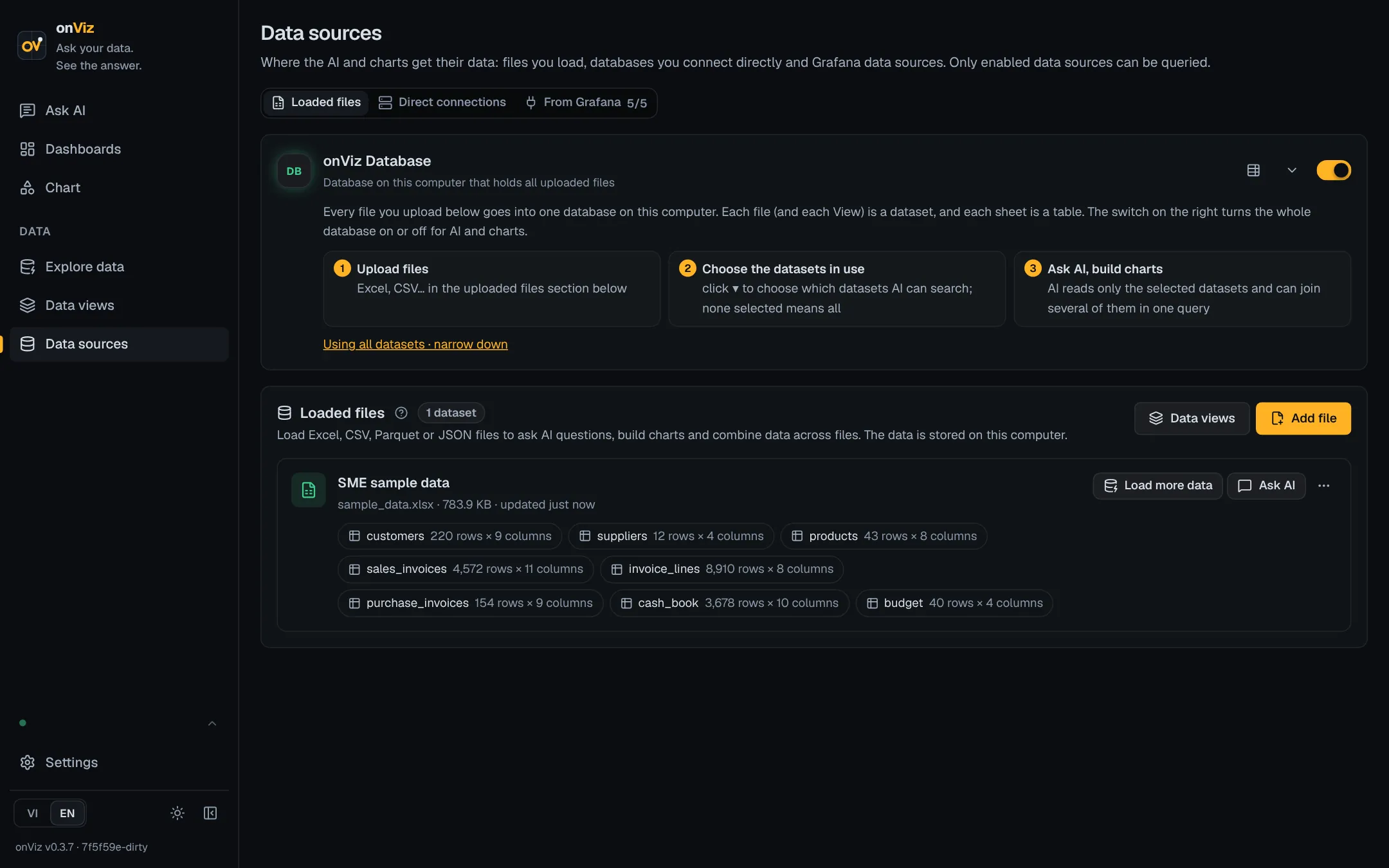
    Drag an Excel or CSV file in, or connect a database. Not ready yet? One click installs sample data with three finished reports.

    Data sources screen with loaded Excel tables
  2. 2

    Ask the AI

    “Overdue receivables by customer.” The AI answers with a chart and shows the exact table it used, so you can check before sending.

  3. 3

    Save and reuse

    Pin charts to a dashboard. Next month, load the new file and open the report. The numbers are already updated.

Take a look

Built for people who work with numbers

onViz screen

Screenshots of onViz 0.3.7 with sample data. The report and charts above are redrawn with ECharts using illustrative numbers.

Privacy

Your numbers stay on your computer

onViz has no server that receives your data. Every calculation runs on your machine, on the full dataset. The AI only sees what it needs to write the query.

  • Files never leave your machine The AI receives your question, column names and a few sample rows. Emails and phone numbers are masked, and sample rows can be turned off.
  • Read only Two layers block any statement that would change or delete data. onViz never edits your Excel files or your books.
  • You choose the AI Use Claude or ChatGPT with your own account, or sign in with Claude Code or Codex. You pay the provider directly, with no markup.
  • Encrypted secrets Passwords and API keys are encrypted and kept in the operating system's secure storage.

Compare

How onViz compares with ChatGPT, Claude and BI tools

ChatGPT and Claude are great for one-off questions and writing. onViz is built for the reports you make every month from company data, and it can use your ChatGPT or Claude plan to do it.

Feature onViz ChatGPT Claude · Claude Code Excel + Copilot Power BI
Where your data is processed YesOn your computer NoFiles uploaded to OpenAI PartlyUploaded to Anthropic; Claude Code works locally PartlyOneDrive / SharePoint PartlyMicrosoft cloud
Company databases (PostgreSQL, MySQL, SQL Server, MongoDB) YesBuilt in, read-only PartlyMostly uploaded files and cloud apps PartlyYou write scripts or set up MCP PartlyThrough Power Query YesYes, set up by IT
Saved charts and dashboards YesDashboards with filters, history NoAnswers stay in the chat NoOne-off charts or code PartlyCharts inside each workbook YesYes
Next month’s numbers YesLoad the new file, reports update NoUpload and ask again PartlyRe-run your script PartlyRefresh Power Query YesScheduled refresh
Protection for your data YesSELECT only, secrets masked from AI PartlyWorks on copies you upload PartlyCan run any command you approve PartlyAI can edit the workbook YesRead-only reports
Skills needed YesNone: ask in plain language YesNone PartlyTerminal and scripting PartlyExcel, Power Query NoData modelling, DAX
Cost YesFree; pay your AI provider per use, or use your ChatGPT / Claude plan PartlyPlus / Pro subscription PartlyPro / Max subscription PartlyMicrosoft 365 + Copilot licence PartlyPer-user licence

Based on public product information, November 2026. Other products change often; check their sites for current details.

Already pay for ChatGPT or Claude?

Sign in with Codex (ChatGPT Plus / Pro) or Claude Code (Claude Pro / Max) and onViz uses that plan. No API key, no extra cost.

Use each for what it does best

Draft emails and explore a single file in ChatGPT or Claude. Keep the numbers you report every month in onViz, connected to the source and checked by you.

Not a replacement for Excel

onViz only reads. Keep doing your bookkeeping in Excel and your accounting software; onViz turns the results into reports.

Pricing

Start free, no account needed

Free

$0 forever

Everything you need to use onViz every day, on one computer.

  • Unlimited AI chat questions
  • Excel and CSV import
  • Connect PostgreSQL, MySQL / MariaDB, SQL Server, MongoDB and Grafana (Prometheus, Elasticsearch and other Grafana data sources)
  • Dashboards, sample data and reports
  • PNG, CSV, Excel and PDF export
Download

Pro Coming soon

— price announced at launch

For recurring reports that should run on their own.

  • Everything in Free
  • Scheduled reports
  • Auto-import new files from a folder
  • Report templates and threshold alerts
  • Monthly AI spending limit
Start with Free

AI usage is billed by Claude or ChatGPT, usually a few cents per question. With a Claude Pro / Max or ChatGPT Plus / Pro plan it costs nothing extra.

FAQ

Common questions

Is my data sent to the internet?

No. Files stay on your computer. When you chat, onViz sends the AI your question, column names and a few sample rows with emails and phone numbers masked. You can turn sample rows off.

I only have Excel files. Can I use it?

Yes, and most people start that way. Multi-sheet workbooks, merged cells and Vietnamese date formats are handled.

Do I pay for anything besides onViz?

A small AI cost, paid directly to Anthropic or OpenAI. If you already have Claude Pro / Max or ChatGPT Plus / Pro, sign in with Claude Code or Codex and pay nothing extra.

Can the AI get numbers wrong?

It can. onViz always shows the query and the table behind each chart so you can check before you share.

Which computers does it run on?

macOS on Apple Silicon, Windows 10/11 (64-bit, CPU with AVX2) and Linux.

Does onViz change my Excel files?

No. onViz only reads. Keep doing your bookkeeping in Excel and your accounting software.

Can my whole team use it?

Today each person installs their own copy and colleagues view reports over the office network. A shared team edition is planned.

Download

Get onViz

onViz is in final testing. Downloads for macOS, Windows and Linux open soon. Leave your email and we will let you know.

Get notified at launch

Latest version 0.3.7. The app updates itself and asks before installing.

macOS

Apple Silicon (M1 or newer) · .dmg

Coming soon Download

Windows

Windows 10 / 11, 64-bit · installer

Coming soon Download

Linux

AppImage / .deb, x86-64

Coming soon Download

Windows needs a CPU with AVX2 (most computers from 2015 onwards); the installer checks for you.

Ask your data. See the answer.

Install onViz, add the sample data and ask your first question in five minutes.

Get notified at launch Download for free